Creating Text on Report
You can only create text on a user-created report. If necessary, a Skyward report can be cloned in order to make changes to the layout.
Scroll past the video to access the step-by-step instructions.
Audio Transcript
Hi! It's Jake from Skyward. Let's learn about Creating Text on a Report. We'll navigate within the Menu, locate the Reporting module, and select the Report Manager under Features. We'll locate our report that we wish to modify and access the design report screen. In our example, we're going to add a text to the Report Header for the title of the report. To do this, I need to expand my Report Header line, select Report Header, and then select the Text icon to insert my text field on the line where I wish. Since I want my text to center across the page, I need to modify the width of my field. I can then enter the Custom Text in the field at the bottom of the screen. This report is called the Student Activities List. Once I have my text entered, I can click anywhere on the screen and I will see that text show up in my field. In order to get that text centered, I'll have to update my Horizontal Alignment. Once my field is formatted the way I wish, I can save my changes. That's all there is to creating text on a report.
Hi! It's Jake from Skyward. Let's learn about Creating Text on a Report. We'll navigate within the Menu, locate the Reporting module, and select the Report Manager under Features. We'll locate our report that we wish to modify and access the design report screen. In our example, we're going to add a text to the Report Header for the title of the report. To do this, I need to expand my Report Header line, select Report Header, and then select the Text icon to insert my text field on the line where I wish. Since I want my text to center across the page, I need to modify the width of my field. I can then enter the Custom Text in the field at the bottom of the screen. This report is called the Student Activities List. Once I have my text entered, I can click anywhere on the screen and I will see that text show up in my field. In order to get that text centered, I'll have to update my Horizontal Alignment. Once my field is formatted the way I wish, I can save my changes. That's all there is to creating text on a report.
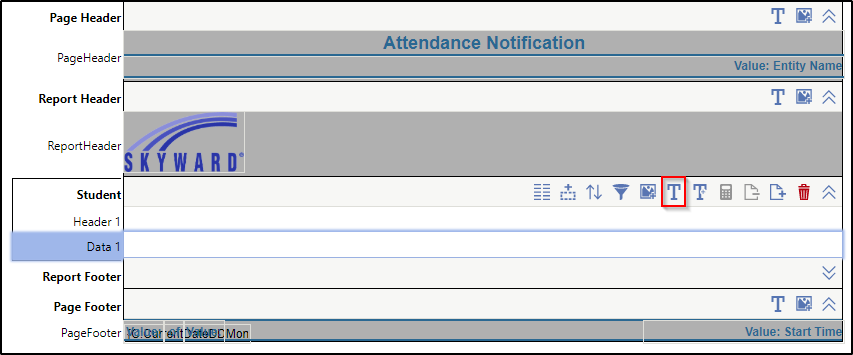
- Click the Text icon near the top right of the highlighted section.
The image below displays an example of a Report Designer window with the Text icon highlighted.
Result(s)
For more detailed information, please refer to the "Creating Text on Report" article in the Help Center.