Entering Grade Overrides for Individual Students
You can also mass create grade overrides and percent adjustments if you wish to update grades for multiple students at the same time.
Scroll past the video to access the step-by-step instructions.
Audio Transcript
Entering grade adjustments in your gradebook enables you to modify student grades if you feel the grade a student will receive based on the calculated score does not reflect the student's achievement for the grading period. We can begin by navigating to the Menu, Teacher Access, Gradebook, and then Gradesheet. If we come to the gradesheet for a particular class, we can use the Class List option and select the tile for the appropriate class. To override an individual student's term grade, we can click on the cell for the grade we wish to update. We can enter a Grade Override from the drop-down list, and then enter a comment as to why and click Save. To add a Percent Adjustment for a student, we can click on the term grade, put in the number of the percentage that we’d like to increase or decrease the student's grade by, and again, add a comment and Save. It's important to note that we can only add percent adjustments and grade overrides in open grading periods. Now that you know how to enter grade overrides for individual students, entering grade adjustments in your gradebook can be a quick and easy process.
Entering grade adjustments in your gradebook enables you to modify student grades if you feel the grade a student will receive based on the calculated score does not reflect the student's achievement for the grading period. We can begin by navigating to the Menu, Teacher Access, Gradebook, and then Gradesheet. If we come to the gradesheet for a particular class, we can use the Class List option and select the tile for the appropriate class. To override an individual student's term grade, we can click on the cell for the grade we wish to update. We can enter a Grade Override from the drop-down list, and then enter a comment as to why and click Save. To add a Percent Adjustment for a student, we can click on the term grade, put in the number of the percentage that we’d like to increase or decrease the student's grade by, and again, add a comment and Save. It's important to note that we can only add percent adjustments and grade overrides in open grading periods. Now that you know how to enter grade overrides for individual students, entering grade adjustments in your gradebook can be a quick and easy process.
-
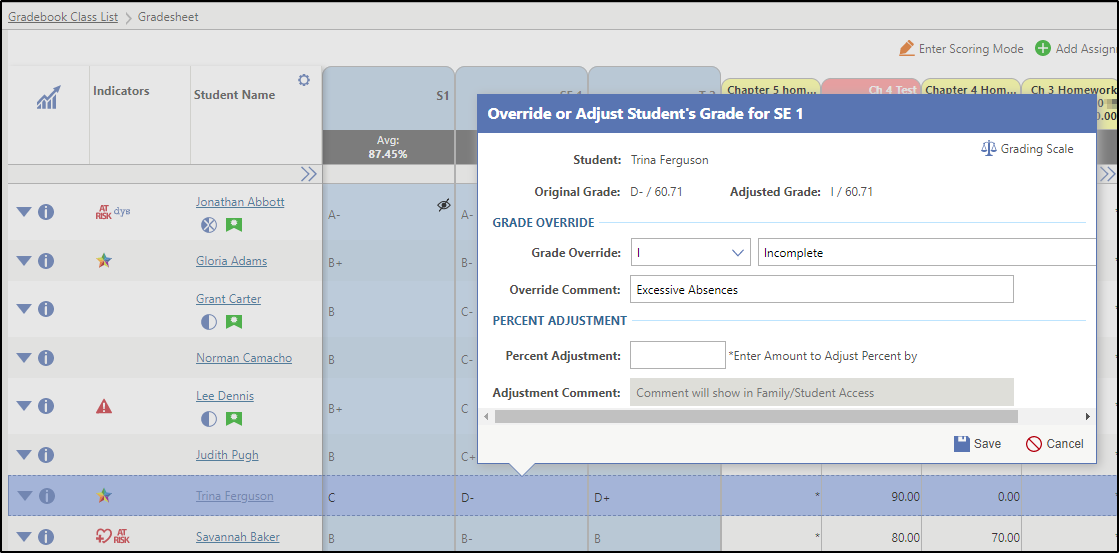
To enter a grade override, complete the following
sub-steps.
-
Enter an Override Comment to be displayed in the Family Access and
Student Access
portals.
For example, you could indicate the student turned in missing work.
This field is only enabled if you entered a grade override.
-
Enter an Override Comment to be displayed in the Family Access and
Student Access
portals.
-
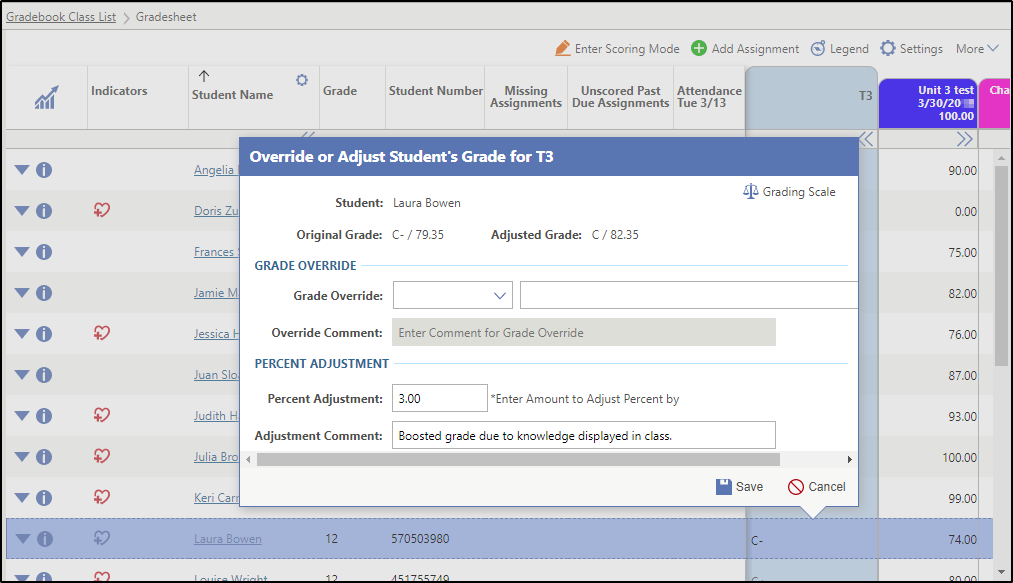
To enter a percent adjustment, complete the following
sub-steps.
The Percent Adjustment option only displays if this feature has been enabled administratively.
-
Enter an Adjustment Comment to be displayed in
Family Access
and Student Access.
This field is only enabled if you entered a percent adjustment. If you entered a percent adjustment, you must enter an adjustment comment.
For example, you could indicate the student's grade was boosted due to demonstration of knowledge.
-
Enter an Adjustment Comment to be displayed in
Family Access
and Student Access.
Result(s)
You have successfully entered grade overrides or percent adjustments for an individual student.